
Load & Stress Testing
Test your site with thousands of bots. Launch real Chrome browsers or lightweight HTTP clients from 32 cloud regions. Prevent catastrophic site crashes by testing with heavy traffic.
Your site has a breaking point. Load test to find it before your users do.
Every website, web application, and API has its breaking point.
Yours might be fast and stable, only to crash when it's hit by peak traffic or an unexpected spike.
Extra traffic is a nice opportunity if your site can handle it. But if it crashes or slows down your site, you'll waste the traffic and damage your brand.
Load testing (or stress testing) is the technique of simulating peak traffic conditions ahead of time, so you can proactively find scalability bottlenecks and optimize your site for heavy traffic.
Effective load testing greatly reduces your risk of costly site failure and downtime.
Ready to get started? Create your free account with 50 units of Loadster Fuel, or read a short Introduction to Load Testing if you'd like a little more background.
Load test with real headless Chrome browsers or lightweight HTTP clients. Use your choice of Playwright, Browser Bots, or Protocol Bots.

Playwright Bots
Run your Playwright Test scripts at scale through Loadster's cloud. Ideal for teams already using Playwright or who want programmatic control with an open source testing framework, combined with Loadster's cloud scaling and reporting.
 4X
4X

Browser Bots
Record scripts in your browser with Loadster's free extension and edit them visually. Add JavaScript if necessary. Browser Bots automate real headless Chrome browsers for realistic web application testing with a minimal learning curve.
4X

Protocol Bots
Protocol Bots execute scripted HTTP/S requests against your API or static website. Testing at the protocol layer is cost-effective and easily scales to hundreds of thousands of concurrent bots, and is ideal for testing HTTP APIs at scale.
1X
Better test results, less effort. Move faster with browser-based script recording, fully managed cloud infrastructure, live test metrics, and automatic reports.
Record test scripts
Record load test scripts right in your browser with the Loadster Recorder extension for Chrome or Firefox. Just navigate your site like a real user, while Loadster automatically records every action into a reusable test script.
Edit and replay scripts
Play scripts as often as you like in Loadster's script editor. Bots execute your script and give you immediate real-time feedback. In the editor you can add, edit, and replace steps from the recording, or you can even build a script from scratch.
Configure test scenarios
A scenario is a reusable configuration for a load test. You'll specify the number of bots in each group, the AWS or GCP regions bots will run from, which of your scripts to execute, and the schedule for ramping the load up and down.
Launch your load test
When you launch a load test from a scenario, Loadster quickly spins up cloud resources to power your bots. Tests usually start in about 2-3 minutes, using fully managed infrastructure through Loadster's AWS and GCP cloud providers.
Observe real-time results
While a load test runs, your bots report real-time metrics to Loadster, and Loadster surfaces the latest details and diagnostics within seconds. Keep tabs on response times, throughput, errors, and detailed traces so you can see how your site is performing under load.
Generate test reports
After a load test finishes, Loadster automatically creates a detailed report so you can review your site's performance and scalability. This includes detailed graphs showing response times, errors, network and transaction throughput, and more. The report also includes detailed traces with request and response bodies or screenshots to help with troubleshooting.
Repeat and iterate
Load testing is an iterative process, and it's rare that everything goes perfectly on the very first try. After all, the point of the test is to discover scalability bottlenecks so you can fix them instead of crashing in production. With Loadster you can quickly re-test a previous scenario, or make changes to your scripts or scenarios and run again at any time.
Load testing, stress testing, soak testing, and more. Test your site with different traffic conditions and ramp patterns.
Loadster scenarios are flexible enough to simulate a variety of traffic patterns. Run requirements-driven load tests, stress tests, spike tests, and soak tests — depending on what you need to learn.
Load testing
Simulate a realistic level of concurrent traffic to measure how your site performs under expected peak conditions. A load test typically ramps up to a target number of users, holds steady, and then ramps down.
Stress testing
Push beyond normal traffic levels to find your site's absolute breaking point. Stress tests keep ramping up until something fails — a server runs out of memory, response times become unacceptable, or errors occur.
Spike testing
Simulate a sudden burst of traffic to see how your site handles a rapid increase in users. Spike tests are useful for validating auto-scaling configurations and understanding how quickly your infrastructure scales and recovers afterwards.
Soak testing
Run a sustained load over a longer period (hours or even days) to uncover problems that only appear over time. Soak testing is a good way to detect memory leaks, connection pool exhaustion, or gradual performance degradation.
Real-time graphs, metrics, and traces during each load test. Instant reports that you can share with your team afterwards.
While a load test runs, Loadster collects real-time metrics from every bot and displays them in a live dashboard. You don't have to wait for the test to finish to see what's happening.
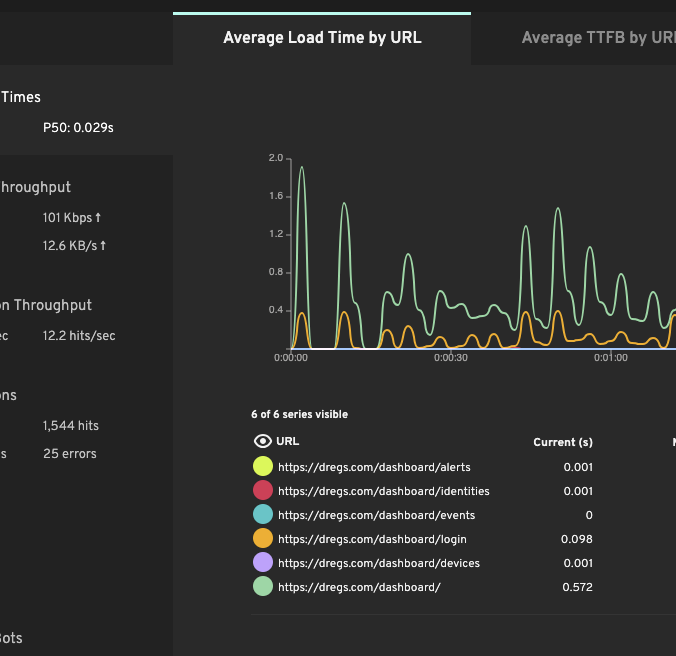
Response times
See how long each page, request, or transaction takes to complete as the load increases. Response times are aggregated by average and percentile so you can distinguish between typical and worst-case performance. When response times start climbing, you've found a bottleneck.
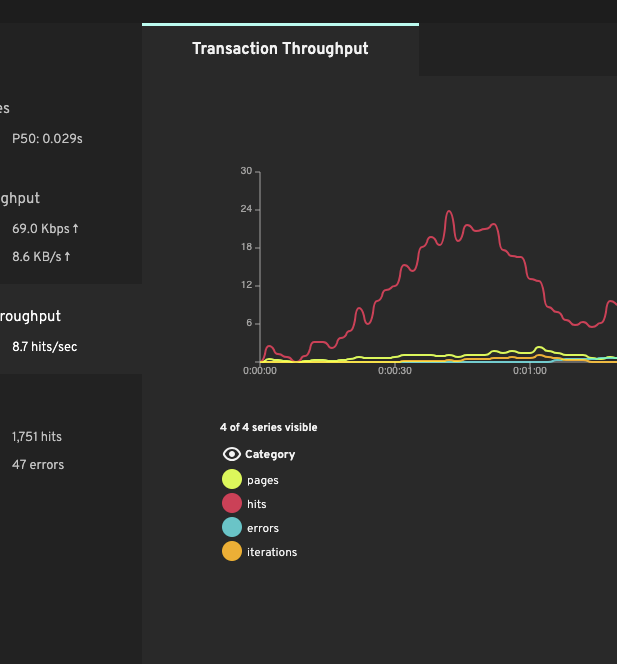
Throughput
Track requests per second, error rates, and network data transferred in real time. Throughput shows how much traffic your site is actually handling — and when it plateaus, that's often the first sign that your application or infrastructure has reached its limit.
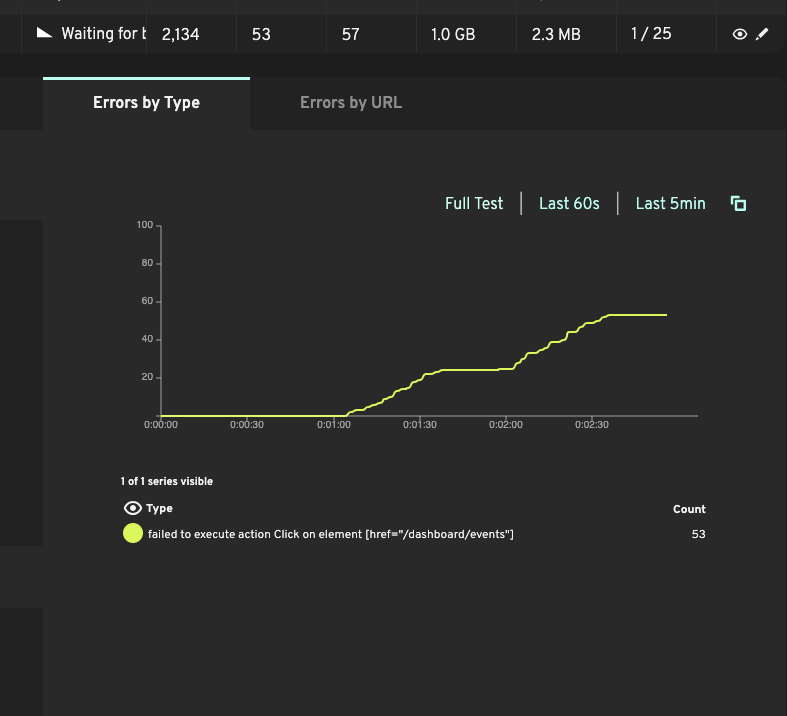
Error rates
HTTP errors, timeouts, and script failures are tracked throughout each test so you can see exactly when things start breaking and correlate failures with the level of concurrent traffic. Pinpoint the load threshold where your site transitions from healthy to struggling.
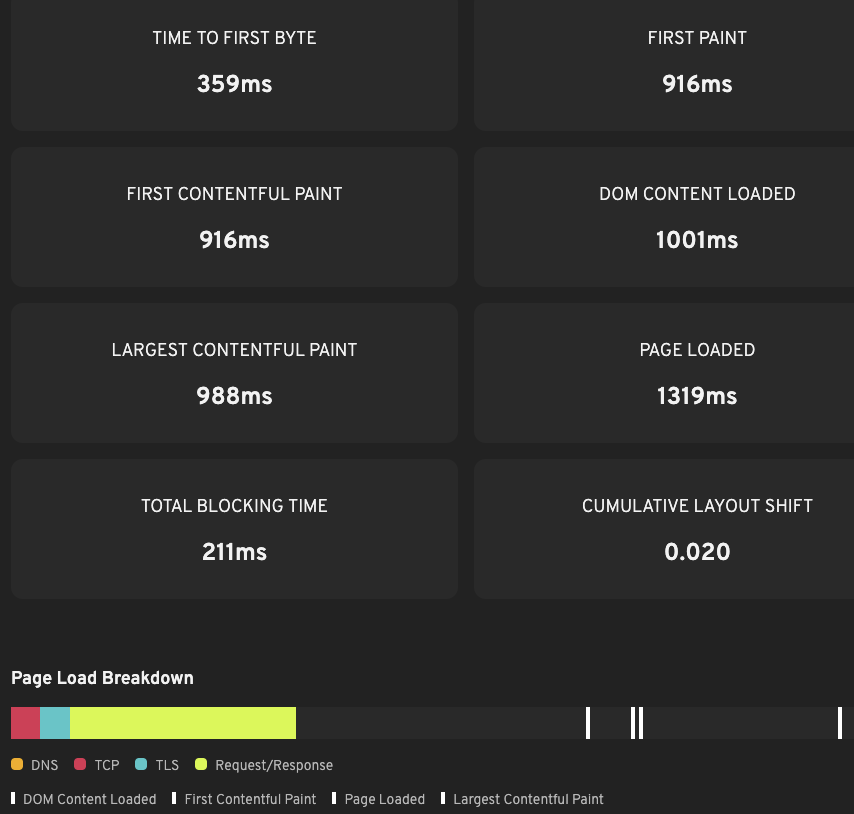
Page timings
Browser and Playwright bots capture real browser metrics including Time to First Byte (TTFB), First Contentful Paint (FCP), and Largest Contentful Paint (LCP). These Core Web Vitals affect user experience and search rankings, and often degrade when the site is under heavy load.
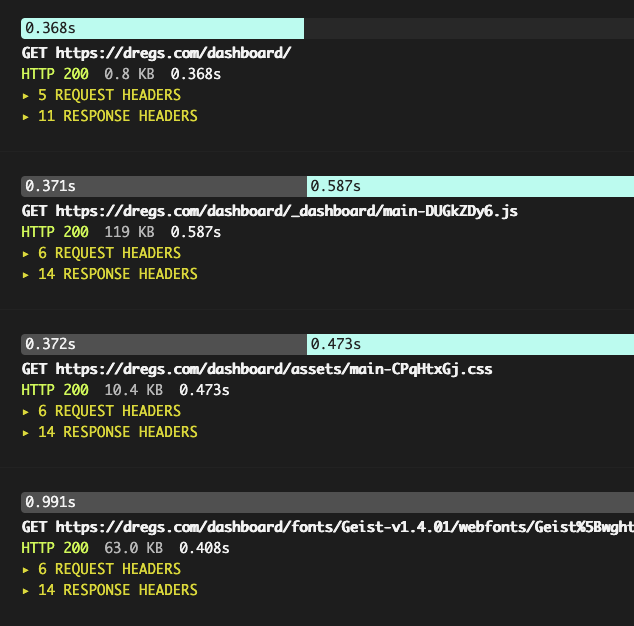
Detailed traces
Bots request/response details and, for browser-based tests, screenshots of what the bot saw at each step. When something fails under load, traces let you dig into the exact request that broke and see the server's response. This helps you debug your scripts and diagnose problems with your site.
Load test from 32 cloud regions across AWS and GCP clouds. Monitor from 8 dedicated locations on 5 continents.
Loadster scales with your testing and your budget. Choose between flexible pay-as-you-go and subscription pricing.
Monthly Fuel Plans
Starting at $78 a month
Subscribe to a monthly plan to automatically add fuel every month at a discount. Unused fuel rolls over as long as you keep the plan.
Plan PricingPay As You Go
Starting at $97 for 1000 units
Purchase as much Loadster Fuel as you need for your load testing and monitoring. No commitment, just buy it when you need it.
Fuel PricingNot just a load testing platform... Loadster also has Site & API Monitoring. Reuse your load testing scripts for round-the-clock monitoring.
The Loadster scripts you write for load testing also work for 24×7×365 site monitoring. Instead of running thousands of bots at once, a monitor runs a single bot on a schedule, alerting you if anything goes wrong with your site.
Set up custom notification policies to receive alerts via email, SMS, phone calls, or integrations with PagerDuty, Opsgenie, and other incident management tools.
Loadster has helped improve the performance, scalability, and uptime of thousands of sites. Proud to be chosen by many of the best teams.


Move fast
Don’t crash
Ready to cut your risk of downtime? Load test to prevent crashes. Monitor to react quickly.