
Web Application Load Testing
Discover the scalability bottlenecks in your application's critical flows. Load test with thousands of Playwright, Browser Bots, or Protocol Bots from 32 cloud regions. Launch in minutes and get actionable results.
Web application load testing simulates many concurrent users moving through your app at once, so you can see how it holds up before a launch or high-traffic event. Loadster makes it easy to test realistic user journeys with real web browsers.
Load testing results without the endless configuration. Loadster's cloud testing platform helps you move faster: browser-based script recording, live test metrics, automatic reports.
Record test scripts
Record load test scripts right in your browser with the Loadster Recorder extension for Chrome or Firefox. Just navigate your site like a real user, while Loadster automatically records every action into a reusable test script.
Edit and replay scripts
Play scripts as often as you like in Loadster's script editor. Bots execute your script and give you immediate real-time feedback. In the editor you can add, edit, and replace steps from the recording, or you can even build a script from scratch.
Configure test scenarios
A scenario is a reusable configuration for a load test. You'll specify the number of bots in each group, the AWS or GCP regions bots will run from, which of your scripts to execute, and the schedule for ramping the load up and down.
Launch your load test
When you launch a load test from a scenario, Loadster quickly spins up cloud resources to power your bots. Tests usually start in about 2-3 minutes, using fully managed infrastructure through Loadster's AWS and GCP cloud providers.
Observe real-time results
While a load test runs, your bots report real-time metrics to Loadster, and Loadster surfaces the latest details and diagnostics within seconds. Keep tabs on response times, throughput, errors, and detailed traces so you can see how your site is performing under load.
Generate test reports
After a load test finishes, Loadster automatically creates a detailed report so you can review your site's performance and scalability. This includes detailed graphs showing response times, errors, network and transaction throughput, and more. The report also includes detailed traces with request and response bodies or screenshots to help with troubleshooting.
Repeat and iterate
Load testing is an iterative process, and it's rare that everything goes perfectly on the very first try. After all, the point of the test is to discover scalability bottlenecks so you can fix them instead of crashing in production. With Loadster you can quickly re-test a previous scenario, or make changes to your scripts or scenarios and run again at any time.
Web apps have a lot of moving parts. Load test end-to-end user flows, not just a single URL.
Modern web applications are complicated machines. Testing them means dealing with logins, sessions, databases and database pools, background jobs, third-party APIs, and often heavy client-side JavaScript all at once.
A test that just hammers the homepage tells you little about whether your application's critical flows can handle heavy concurrency with real-world traffic. Our step-by-step guide on how to load test a website covers choosing those flows.
Loadster bots can simulate highly realistic end-to-end user journeys. A single test script can automate a real Chrome browser to sign in, search, add items to the cart, and submit a form, all the while verifying that each step actually returned what it should. Stores heading into a sale can follow the ecommerce load testing guide for cart and checkout.
There are several ways to create a script. Record with the free Loadster Recorder browser extension, edit in the dashboard, import it from another platform, or have your favorite AI assistant like Claude or ChatGPT build it through the Loadster MCP server.
Load test with your favorite AI assistant. Loadster works with Claude, ChatGPT, Codex, Cursor, VS Code, and other MCP clients.
Describe the flow you want to test in plain language. Your assistant writes the script, plays it with a single bot until every step passes, builds a load test scenario, launches it, and analyzes the results.
- Scripting is done for you. Playwright, Browser Bot, or Protocol Bot scripts, played and fixed by your assistant until they work.
- Test setup is simple. Bot counts, cloud regions, and ramp-up patterns, straight from your description.
- Reports and incidents, explained. Your assistant reads the test report or a failed monitor cycle and helps work out what went wrong.
- You: write a loadster script for our checkout on staging.acmeoutfitters.com in a real browser. search for trail shoes, add one to the cart, check out as a guest. then set up a load test with 1000 bots from virginia and london
-
get_documentationcreate_script"Guest Checkout" 7 steps from the homepage to the order confirmation -
play_scriptget_play_statusStep 5 failed because “Continue as guest” never became clickable -
get_screenshotThe screenshot shows a cookie banner covering the button -
update_scriptplay_scriptget_play_statusDismissed the banner first, and all 7 steps passed in 9.2 seconds -
list_enginescreate_scenario"Guest checkout, 1,000 browsers" Saved to your Staging project -
Ready to go. Want me to launch it and keep an eye on it while it runs, or would you rather press Launch yourself? When it finishes, I'll read the report and help you analyze the results.
-
ScenarioGuest checkout, 1,000 browsers
- 500 Browser Bots
- N. America - Virginia
- 500 Browser Bots
- Europe - United Kingdom
- Ramp
- Up in 60s, hold 5 min
Launch Test
Choose the right bots for your test. Real browser testing with Playwright or Browser Bots, or Protocol Bots for lightweight HTTP.
The Loadster platform has three types of bots. Take your pick! Real browsers are the closest thing to real users for web applications and SaaS products with heavy front ends. Protocol testing is perfect for APIs and simple sites. You can even mix multiple bot types in the same load test.

Browser Bots
Record scripts in your browser with Loadster's free extension and edit them visually. Add JavaScript if necessary. Browser Bots automate real headless Chrome browsers for realistic web application testing with a minimal learning curve.

Protocol Bots
Protocol Bots execute scripted HTTP/S requests against your API or static website. Testing at the protocol layer is cost-effective and easily scales to hundreds of thousands of concurrent bots, and is ideal for testing HTTP APIs at scale.

Playwright
Run your Playwright Test scripts at scale through Loadster's cloud. Ideal for teams already using Playwright or who want programmatic control with an open source testing framework, combined with Loadster's cloud scaling and reporting.
Measure what matters. Loadster surfaces real-time graphs, percentiles, and traces with your load test results.
Loadster gathers metrics from every bot in real time, so you don't have to wait for a test to finish before you understand what's happening with your site. A typical load test report includes:
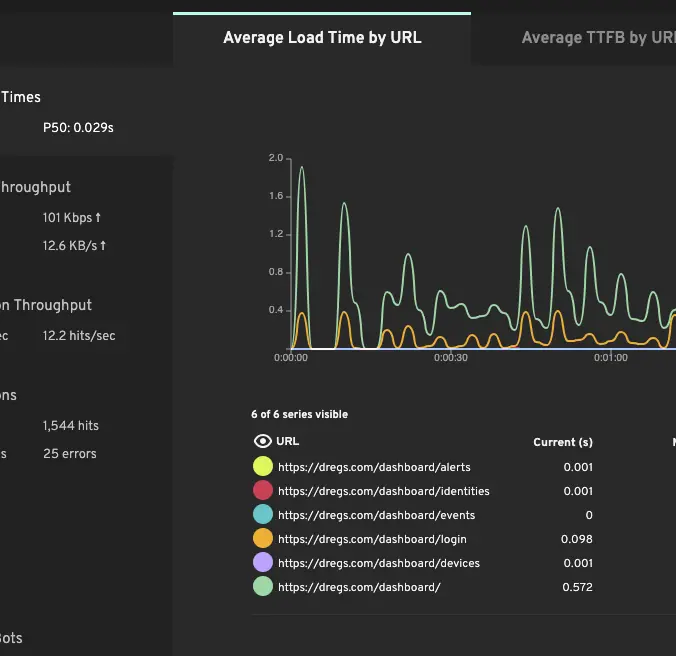
Response time averages and percentiles
Average response time is a starting point, but the percentiles are what tell you whether the experience is consistent. Loadster reports the 50th, 90th, 95th, and 99th percentile so you can see whether the slowest 5% of users are seeing 1 second or 30 seconds.
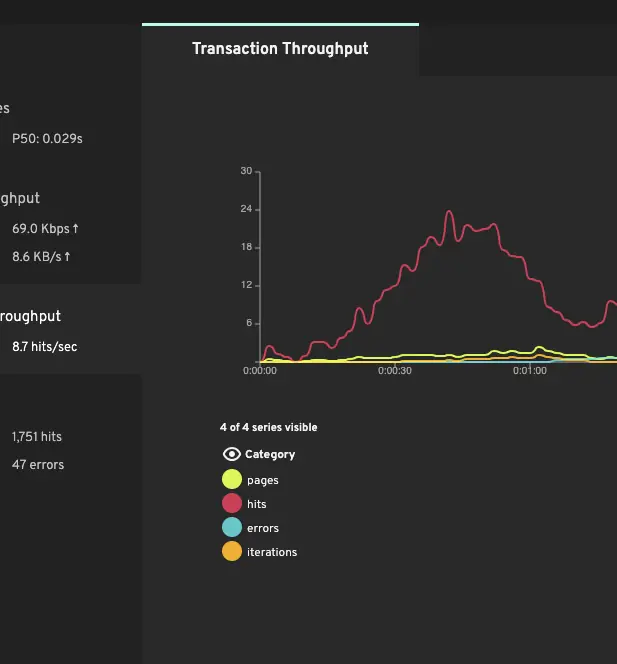
Throughput and concurrency
Requests per second tells you how much traffic your application is actually handling. When throughput plateaus while concurrent users keep climbing, that's the signature of a saturated bottleneck.
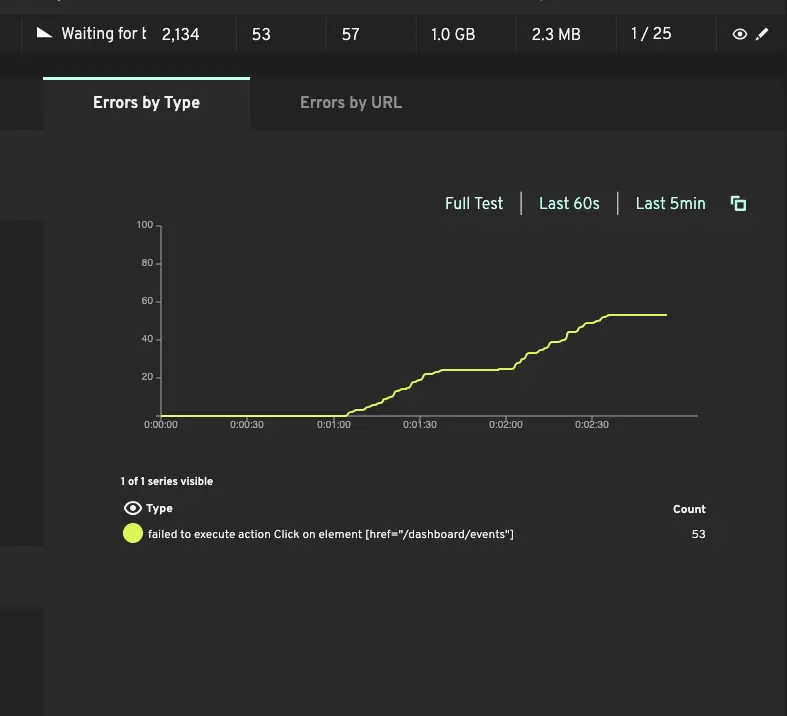
Errors and failed transactions
HTTP errors, socket timeouts, and script failures are tracked throughout the test. Correlate the type and timing of errors with concurrency to identify which component breaks first.
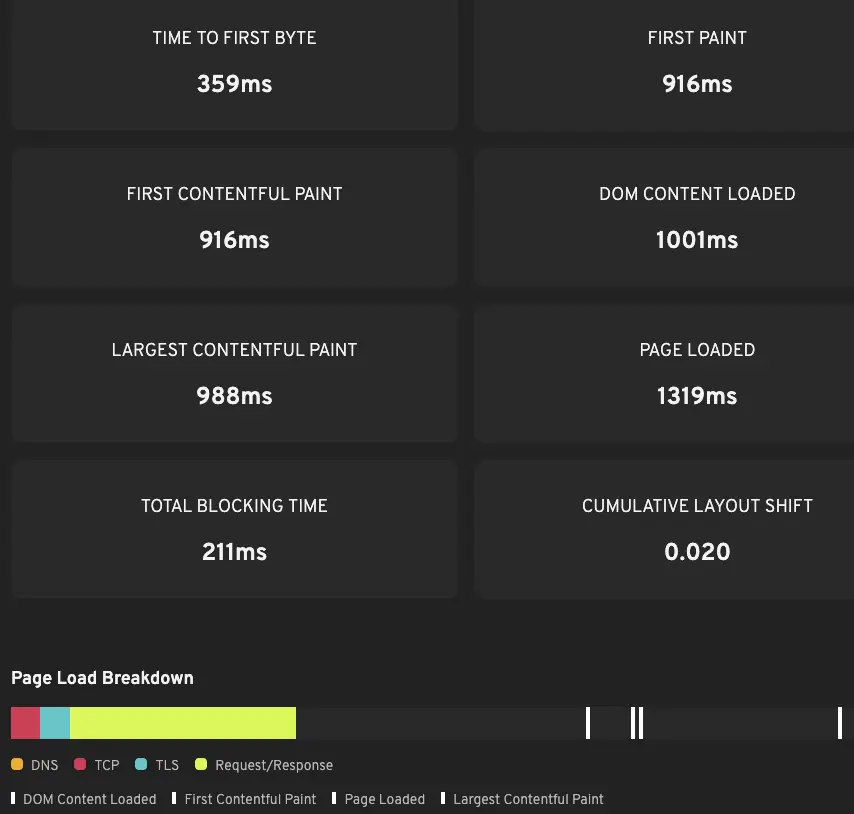
Core Web Vitals under load
Browser and Playwright bots capture TTFB, FCP, LCP, and CLS — the Core Web Vitals that affect both user experience and search rankings. These often degrade well before the backend starts returning errors.
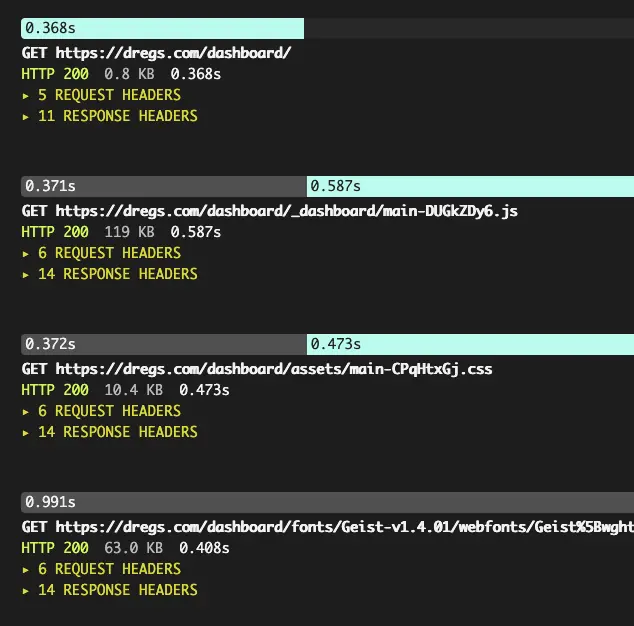
Detailed traces for failed bots
When something fails under load, traces show the exact request that broke, the server's response, and (for browser-based tests) screenshots of what the bot saw. Often the fastest path from "errors spiked at 800 users" to "here's why."
Load test on demand from 32 AWS and GCP cloud regions. Monitor continuously from 8 locations across 5 continents.
Loadster handles the end-to-end test infrastructure so you don't have to mess with it. The platform handles clustering, scaling, load generation, and reporting.
Most load testing tools require you to provision load generators, install software, and wrangle the results yourself. For small tests this might be fine, but for a large distributed test managing the infrastructure could quickly become your entire job (and probably not a job that you wanted).
Loadster gives you that time back with a fully managed cloud load testing platform: the load testing tool, the load engines, and the reporting across 32 AWS and GCP regions, scaling to hundreds of thousands or even millions of concurrent bots on demand. There's nothing to install, no infrastructure to maintain, and nothing to tear down afterward.
Just get in, run your tests, and get out with useful and actionable results and no test infrastructure to babysit.
Use the same scripts for load testing, stress testing, and site monitoring. Same scripts, same platform.
Once a load test script exercises a critical flow, it's working. Ramp it harder as a stress test to find the breaking point before a launch, or schedule it as a synthetic monitor so you know when that flow breaks between releases.
Monitors run every minute, every five minutes, or whatever cadence makes sense. If a cycle fails (a timeout, a broken assertion, a page that didn't load), Loadster opens an incident and alerts your team by email, SMS, phone call, or your incident management integration.
Monitoring catches the problems that happen between releases. Load testing catches the ones that would have happened at peak traffic. Together they cover a lot of ground.
Wire load testing into your CI/CD pipeline. Test continuously to catch performance regressions before they reach production.
Load testing doesn't have to be a quarterly exercise. The Loadster CLI runs from your CI environment (GitHub Actions, GitLab CI, Jenkins, CircleCI, and others), so you can run a quick load test on every pull request and a larger one with each formal deployment. Acceptance criteria such as response time thresholds and error rate ceilings can be encoded in the scenario, so the CI job fails automatically if performance regresses or the load test detects errors.
For teams deploying daily, a 5-minute smoke load test in CI can save you the grief of performance regressions reaching production. Set that up, then use the same scripts for the occasional larger test ahead of peak traffic events.
Loadster has optimized the performance, scalability, and uptime of thousands of sites. We're proud to be a testing platform of choice to elite teams.


Loadster scales with your testing and your budget. Choose between flexible pay-as-you-go and a flat, predictable plan.
Pay As You Go
Starting at $97 for 1,000 units
Purchase as much Loadster Fuel as you need for your load testing and monitoring. No commitment, just buy fuel when you need it.
Check Fuel PricingLoadster Team
$499 a month, billed annually
Load testing and monitoring for the whole team at a flat, predictable price. All-inclusive testing within your plan limits.
Check Team Pricing