
Load Testing for Websites, Web Apps & APIs
Loadster is a cloud load testing platform that simulates heavy traffic with thousands of concurrent bots across 32 regions. Find scalability bottlenecks before your users do — run a test and get your first results in minutes.
Load testing results without the endless configuration. Loadster's cloud testing platform helps you move faster: browser-based script recording, live test metrics, automatic reports.
Record test scripts
Record load test scripts right in your browser with the Loadster Recorder extension for Chrome or Firefox. Just navigate your site like a real user, while Loadster automatically records every action into a reusable test script.
Edit and replay scripts
Play scripts as often as you like in Loadster's script editor. Bots execute your script and give you immediate real-time feedback. In the editor you can add, edit, and replace steps from the recording, or you can even build a script from scratch.
Configure test scenarios
A scenario is a reusable configuration for a load test. You'll specify the number of bots in each group, the AWS or GCP regions bots will run from, which of your scripts to execute, and the schedule for ramping the load up and down.
Launch your load test
When you launch a load test from a scenario, Loadster quickly spins up cloud resources to power your bots. Tests usually start in about 2-3 minutes, using fully managed infrastructure through Loadster's AWS and GCP cloud providers.
Observe real-time results
While a load test runs, your bots report real-time metrics to Loadster, and Loadster surfaces the latest details and diagnostics within seconds. Keep tabs on response times, throughput, errors, and detailed traces so you can see how your site is performing under load.
Generate test reports
After a load test finishes, Loadster automatically creates a detailed report so you can review your site's performance and scalability. This includes detailed graphs showing response times, errors, network and transaction throughput, and more. The report also includes detailed traces with request and response bodies or screenshots to help with troubleshooting.
Repeat and iterate
Load testing is an iterative process, and it's rare that everything goes perfectly on the very first try. After all, the point of the test is to discover scalability bottlenecks so you can fix them instead of crashing in production. With Loadster you can quickly re-test a previous scenario, or make changes to your scripts or scenarios and run again at any time.
Choose the right bots for the job. Real browser testing with Playwright or Browser Bots, or Protocol Bots for lightweight HTTP.
The Loadster platform has three types of bots. Take your pick! Real browsers are better for web applications, SaaS, and modern websites. Protocol testing is perfect for APIs and simple sites. You can even mix multiple bot types in the same load test.

Browser Bots
Record scripts in your browser with Loadster's free extension and edit them visually. Add JavaScript if necessary. Browser Bots automate real headless Chrome browsers for realistic web application testing with a minimal learning curve.
 4X
4X

Protocol Bots
Protocol Bots execute scripted HTTP/S requests against your API or static website. Testing at the protocol layer is cost-effective and easily scales to hundreds of thousands of concurrent bots, and is ideal for testing HTTP APIs at scale.
1X

Playwright
Run your Playwright Test scripts at scale through Loadster's cloud. Ideal for teams already using Playwright or who want programmatic control with an open source testing framework, combined with Loadster's cloud scaling and reporting.
4X
Measure what matters. Loadster surfaces real-time graphs, percentiles, and traces with your load test results.
Loadster gathers metrics from every bot in real time, so you don't have to wait for a test to finish before you understand what's happening with your site. A typical load test report includes:
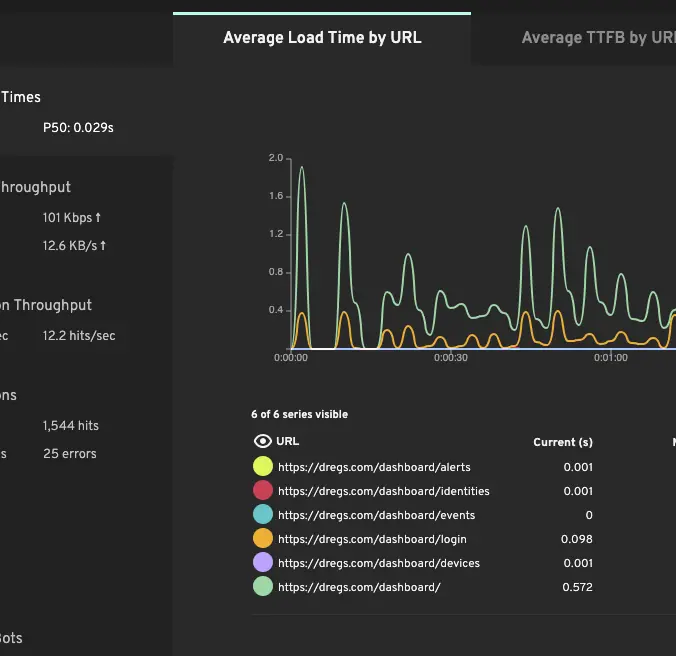
Response time averages and percentiles
Average response time is a starting point, but the percentiles are what tell you whether the experience is consistent. Loadster reports the 50th, 90th, 95th, and 99th percentile so you can see whether the slowest 5% of users are seeing 1 second or 30 seconds.
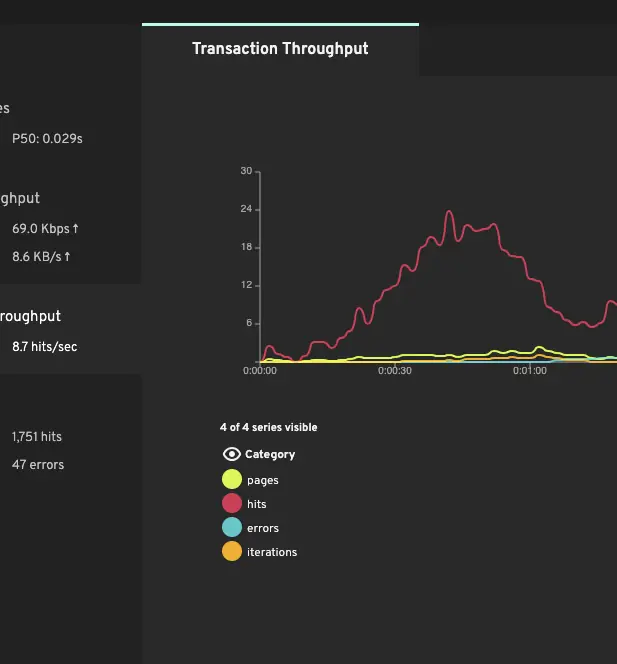
Throughput and concurrency
Requests per second tells you how much traffic your application is actually handling. When throughput plateaus while concurrent users keep climbing, that's the signature of a saturated bottleneck.
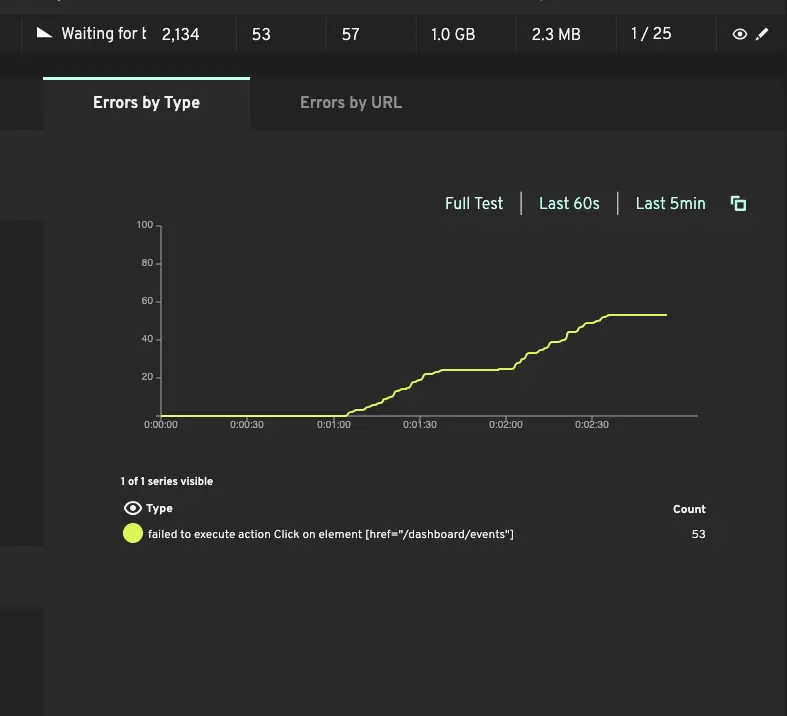
Errors and failed transactions
HTTP errors, socket timeouts, and script failures are tracked throughout the test. Correlate the type and timing of errors with concurrency to identify which component breaks first.
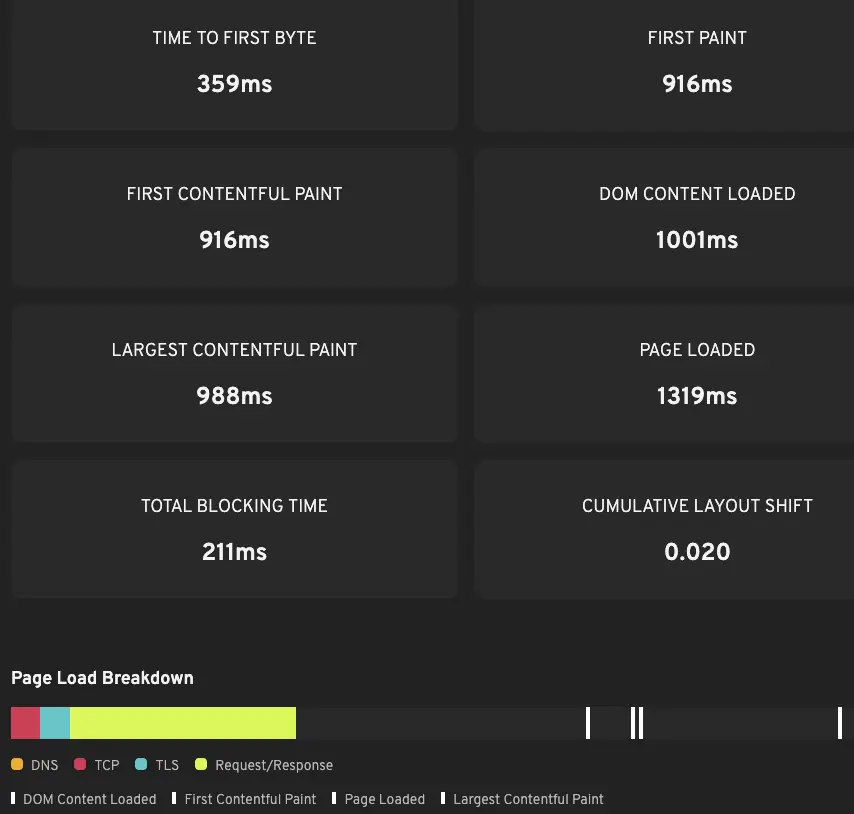
Core Web Vitals under load
Browser and Playwright bots capture TTFB, FCP, LCP, and CLS — the Core Web Vitals that affect both user experience and search rankings. These often degrade well before the backend starts returning errors.
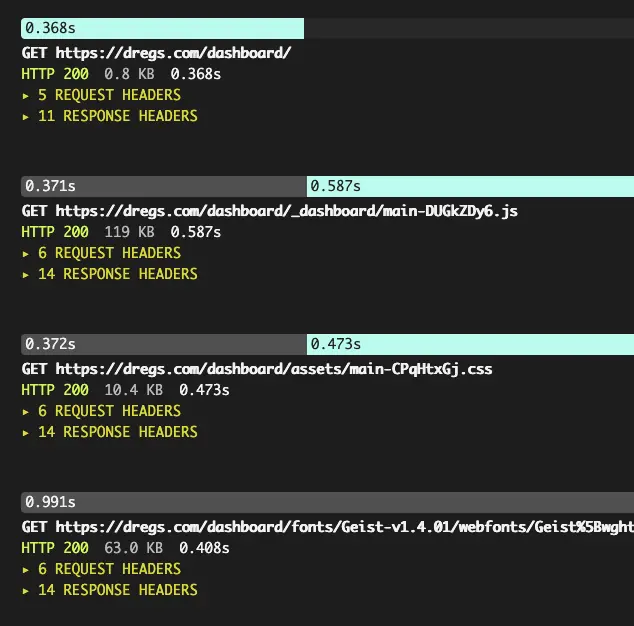
Detailed traces for failed bots
When something fails under load, traces show the exact request that broke, the server's response, and (for browser-based tests) screenshots of what the bot saw. Often the fastest path from "errors spiked at 800 users" to "here's why."
Load test on demand from 32 AWS and GCP cloud regions. Monitor continuously from 8 locations across 5 continents.
A cloud load testing platform, not another tool to install. Loadster runs the infrastructure so you don't have to.
Most load testing tools leave you to provision load generators, install software, and manage distributed agents yourself. Loadster is a fully managed cloud load testing platform: the load testing tool, the load generators, and the reporting all run across 32 AWS and GCP regions, scaling on demand. There's nothing to install and nothing to tear down afterward.
Prefer to hand the work off entirely? Loadster also offers load testing services with performance engineers who can plan, script, and run tests on your behalf. And if your focus is APIs, see API load testing with lightweight protocol bots.
Wire load testing into your CI/CD pipeline. Load test continuously to catch performance regressions.
Load testing doesn't have to be a quarterly exercise. The Loadster CLI runs from any CI environment — including GitHub Actions, GitLab CI, Jenkins, CircleCI — so you can run a small load test on every pull request and a larger one with each formal deployment. Acceptance criteria (response time thresholds, error rate ceilings) can be encoded in the scenario so the CI job fails automatically if performance regresses or the load test detects errors.
For teams running daily deploys, a 5-minute smoke load test in CI is often enough to catch the obvious regressions before they reach production. Then a larger nightly or weekly load test catches the slower drift.
Loadster has optimized the performance, scalability, and uptime of thousands of sites. We're proud to be a testing platform of choice to elite teams.


Loadster scales with your testing and your budget. Choose between flexible pay-as-you-go and predictable subscription pricing.
Monthly Fuel Plans
Starting at $77 a month
Subscribe to a monthly plan to automatically add fuel every month at a discount. Unused fuel rolls over as long as you keep the plan.
Check Plan PricingPay As You Go
Starting at $97 for 1000 units
Purchase as much Loadster Fuel as you need for your load testing and monitoring. No commitment, just buy it when you need it.
Check Fuel Pricing