
Playwright Cloud Load Testing
Loadster runs your Playwright scripts at load testing scale. Launch thousands of concurrent browsers from 32 AWS and GCP regions. Gather live metrics, generate reports, and get your first results in minutes.
You've got your Playwright tests. Now scale them to thousands of concurrent browsers.
Your team likely already has a Playwright test suite. It already works with your site's most important user flows, login sequences, checkout journeys, and other critical features.
Loadster takes those same Playwright scripts and runs them at load testing scale. Launch thousands of concurrent bots, each driving a headless Chrome browser, executing your Playwright scripts in parallel against your site.
If you've already got Playwright tests, there's no need to write separate load testing scripts or pick up another scripting language. You don't even have to maintain separate test suites. The Playwright scripts your QA or dev team already maintains are the same ones that will power your load testing, stress testing, and even 24/7 site monitoring.
Run your Playwright tests just the way they are, no changes required. Or just a few changes if you want to use Loadster datasets.
Loadster runs most ordinary Playwright Test JS scripts with no changes... just paste one in and run it.
But hammering your site with identical requests from every bot isn't always a useful load test. Caching and data
locking might skew the results. That's why Loadster's optional @loadster/bot helper library lets
your Playwright scripts pull unique values from a dataset on each iteration, so every bot behaves like a
different real user, with Loadster's platform taking care of the orchestration, scaling, and parameterization.
import { test } from '@playwright/test';
import bot from '@loadster/bot';

test('search and browse', async ({ page }) => {
  const [username, password] = bot.getVariable('credentials');
  const searchTerm = bot.getVariable('searchTerm');

  await page.goto('https://example.com/login');
  await page.fill('#username', username);
  await page.fill('#password', password);
  await page.click('button[type="submit"]');

  await page.waitForURL('**/dashboard');
  await page.fill('#search', searchTerm);
  await page.press('#search', 'Enter');

  await page.waitForSelector('.results');
});
Dataset variables flow through from Loadster into the script automatically, so each bot in the load test can have its own unique login, search term, or any other column of data you need. The helper also exposes bot context like the current iteration number, bot identifier, and elapsed time if you need them for fine-grained scripting.
Track real browser metrics from every bot. Loadster collects response times, Core Web Vitals, and detailed traces.
Because Loadster runs real browsers for Playwright tests, you get real browser metrics from every bot. Not just server response times, but the full picture of client-side performance.
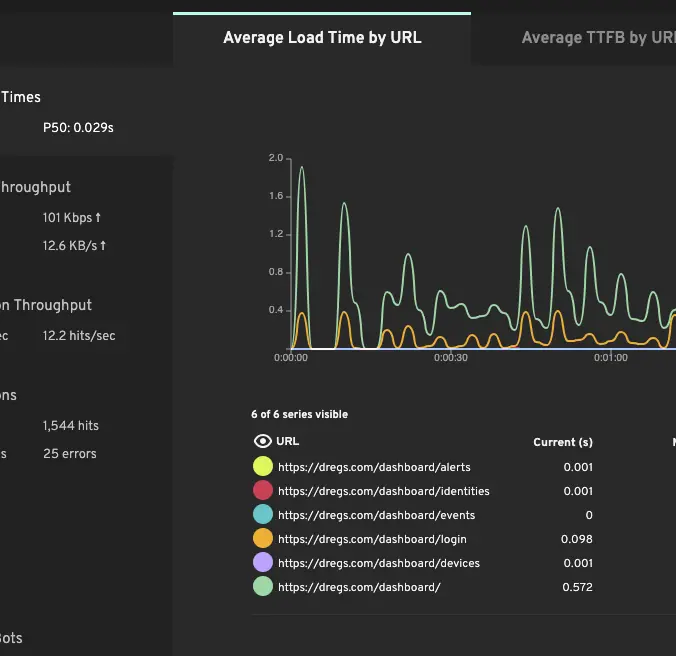
Response times per navigation
Every page.goto(), click, and navigation is measured. Watch how response times change as
the load ramps up, aggregated by URL and broken down by average and percentile.
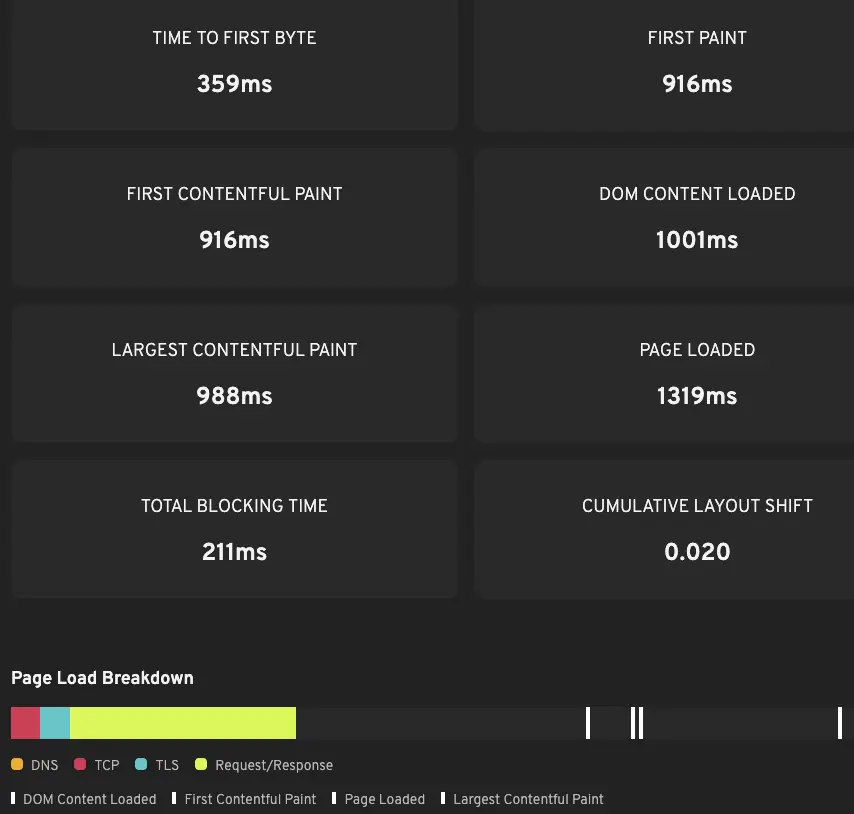
Core Web Vitals captured automatically
Time to First Byte (TTFB), First Contentful Paint (FCP), and Largest Contentful Paint (LCP) are collected from every page navigation. These metrics often degrade well before your site starts returning errors, giving you an early warning that the user experience is suffering.
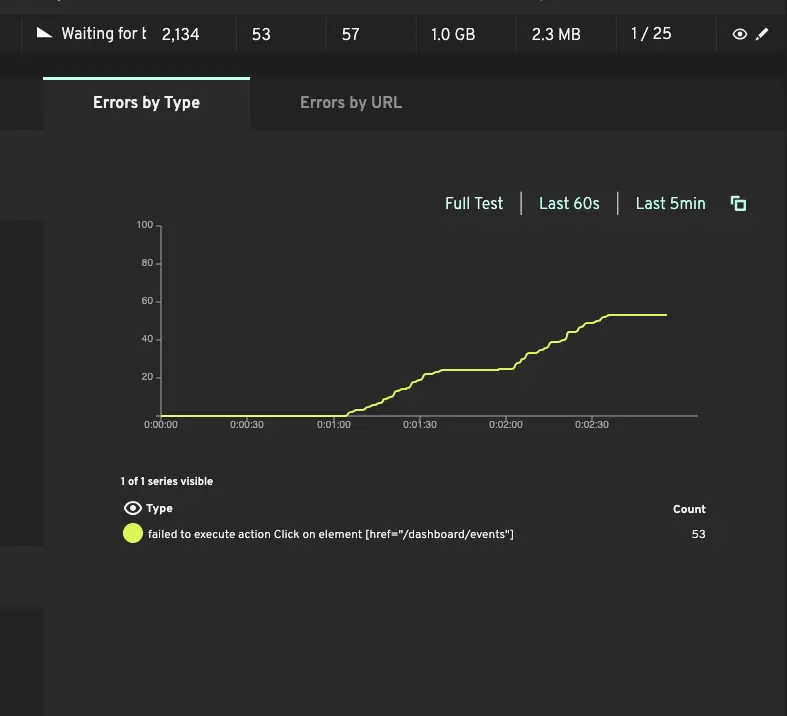
Script errors and assertion failures
Standard Playwright assertions, timeouts, and navigation failures are all tracked throughout the test. When an assertion fails at 500 concurrent users but passed at 100, you've found a bottleneck worth investigating.
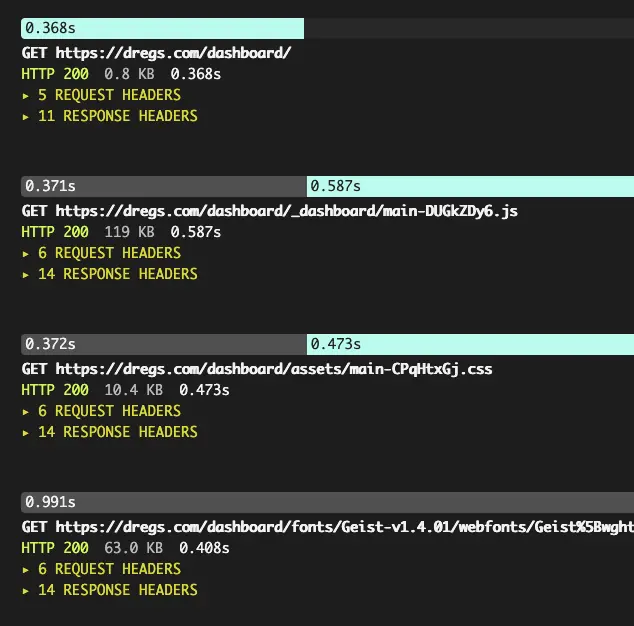
Playwright traces for failed runs
When a Playwright script fails under load, Loadster captures the full Playwright trace — the same
one you'd view locally with npx playwright show-trace. Step through the recording inline to
see exactly where things went wrong.
Load testing and site monitoring, all with the same scripts. Reuse your Playwright scripts for 24/7 monitoring on the Loadster platform.
The same Playwright scripts you use for load testing also work for 24/7 site monitoring. Instead of running thousands of bots concurrently, monitors run a single bot on a regular schedule. Test your site every minute, every five minutes, or whatever cadence makes sense for you.
If a monitor detects a failure — like a timeout, a broken assertion, or a page that didn't load — Loadster alerts your team via email, SMS, phone call, or your incident management integration of choice. The same Playwright traces that help you debug a failed load test also help you diagnose a monitor alert and react quickly.
Playwright isn't your only option... Maybe give Browser Bots and Protocol Bots a try!
If your team doesn't have a Playwright test suite, no worries! Loadster has other solid options for you to choose from.
Browser Bots run scripts recorded with Loadster's Chrome extension. They're ideal for teams who prefer recording and playback with a graphical editor over writing code. Browser Bots also run real headless Chrome browsers, powered by Playwright behind the scenes.
Protocol Bots run lightweight HTTP scripts, perfect for API load testing or high-throughput testing of simple websites. They're considerably less expensive per bot than browser-based testing.
Review the Loadster Manual for an in-depth look at scripting, or the Load Testing Guide for the high-level goals and techniques of load testing.
Load testing results without the endless configuration. Loadster's cloud testing platform helps you move faster: browser-based script recording, live test metrics, automatic reports.
Record test scripts
Record Playwright load test scripts right in your browser with the Loadster Recorder extension for Chrome or Firefox. Just navigate your site like a real user, while Loadster automatically records every action into a reusable test script.
Edit and replay scripts
Play scripts as often as you like in Loadster's script editor. Bots execute your script and give you immediate real-time feedback. In the editor you can add, edit, and replace steps from the recording, or you can even build a script from scratch.
Configure test scenarios
A scenario is a reusable configuration for a Playwright load test. You'll specify the number of bots in each group, the AWS or GCP regions bots will run from, which of your scripts to execute, and the schedule for ramping the load up and down.
Launch your Playwright load test
When you launch a Playwright load test from a scenario, Loadster quickly spins up cloud resources to power your bots. Tests usually start in about 2-3 minutes, using fully managed infrastructure through Loadster's AWS and GCP cloud providers.
Observe real-time results
While a Playwright load test runs, your bots report real-time metrics to Loadster, and Loadster surfaces the latest details and diagnostics within seconds. Keep tabs on response times, throughput, errors, and detailed traces so you can see how your site is performing under load.
Generate test reports
After a Playwright load test finishes, Loadster automatically creates a detailed report so you can review your site's performance and scalability. This includes detailed graphs showing response times, errors, network and transaction throughput, and more. The report also includes detailed traces with request and response bodies or screenshots to help with troubleshooting.
Repeat and iterate
Playwright load testing is an iterative process, and it's rare that everything goes perfectly on the very first try. After all, the point of the test is to discover scalability bottlenecks so you can fix them instead of crashing in production. With Loadster you can quickly re-test a previous scenario, or make changes to your scripts or scenarios and run again at any time.
Load test with Playwright on demand from 32 AWS and GCP cloud regions. Monitor continuously from 8 locations across 5 continents.
Loadster scales with your testing and your budget. Choose between flexible pay-as-you-go and predictable subscription pricing.
Monthly Fuel Plans
Starting at $77 a month
Subscribe to a monthly plan to automatically add fuel every month at a discount. Unused fuel rolls over as long as you keep the plan.
Check Plan PricingPay As You Go
Starting at $97 for 1000 units
Purchase as much Loadster Fuel as you need for your load testing and monitoring. No commitment, just buy it when you need it.
Check Fuel PricingFrequently Asked Questions
Can I use my existing Playwright tests for load testing?
@loadster/bot helper library, which gives scripts access to dataset variables and bot context when you need them.How is Playwright load testing different from regular Playwright tests?
How many concurrent Playwright scripts can Loadster run?
Do my Playwright scripts need to be modified to run in Loadster?
@loadster/bot and call bot.getVariable('name') to pull from a dataset. Everything else (selectors, assertions, navigation, auth) works exactly as in local Playwright.Can I use Playwright scripts for site monitoring as well as load testing?
What's the difference between Playwright scripts and Browser Bots in Loadster?
@playwright/test JavaScript, which is ideal when your team already has a Playwright test suite or wants fully code-driven tests with version control, diffs, and CI integration. Both run in headless Chrome and produce the same metrics.Loadster has optimized the performance, scalability, and uptime of thousands of sites. We're proud to be a testing platform of choice to elite teams.


Move fast
Don’t crash
Ready to cut your risk of downtime? Load test to prevent crashes. Monitor to react quickly.