
Stress Testing: Find Your Site's Breaking Point
Loadster runs real Chrome browsers at massive scale (over 170,000 concurrent browsers in a single test) to stress test your website. Find out how much traffic crashes your site, how it breaks, and whether it recovers cleanly. Fix your site's weaknesses before they impact your real users.
Loadster is your platform for stress testing, load testing, stability testing, and more. Same tools, similar techniques... different goals.
Load testing and stress testing take a similar approach but drive at a different outcome.
A load test is requirements-driven, meant to validate that your site performs well under expected peak traffic.
A stress test, on the other hand, pushes beyond expected peak traffic to find the exact point where things start to go haywire.
Stress testing answers questions a requirements-based load test can't.
At what traffic level does the system actually fail? Does the site degrade gracefully, or become totally unresponsive? Can it recover on its own when the traffic subsides, or does it end up broken and need a restart? Does it suffer any data corruption or loss while it's overloaded?
Loadster does load testing, stress testing, and even site monitoring with the same bots and scripts, so you can take a multifaceted approach to your site's performance and scalability.
Ramp, step, or spike your way to peak traffic conditions. Increase the load aggressively or gradually to find your site's breaking point.
What makes a stress test a stress test is the rate and curve that bots (simulated users) ramp up and down concurrently. A load test is acceptance-oriented; a stress test is exploration-oriented. Launching bots and ramping them up under controlled conditions is far better than finding your site's breaking point the hard way, like during a product launch or a big marketing campaign!
Loadster scenarios support the three common stress-test shapes. Pick the one that matches what you're trying to learn.
Continuous ramp
Keep adding bots without stopping. The classic stress test for finding the exact load level at which performance falls apart.
Stepped ramp
Climb in stages with plateaus between. Lets you observe behavior at each tier of load — best for pinpointing the exact concurrency where things tip over.
Spike test
A sudden sharp burst followed by an equally sudden drop. Simulates flash sales, viral moments, and breaking news — and shows how cleanly the system recovers.
You can read a lot more about what makes a stress test different from an ordinary load test in Load Testing vs Stress Testing.
Stress test your website, not your sanity. Loadster's fully managed cloud platform saves you from endless fiddling with tools and test infrastructure.
Record test scripts
Record stress test scripts right in your browser with the Loadster Recorder extension for Chrome or Firefox. Just navigate your site like a real user, while Loadster automatically records every action into a reusable test script.
Edit and replay scripts
Play scripts as often as you like in Loadster's script editor. Bots execute your script and give you immediate real-time feedback. In the editor you can add, edit, and replace steps from the recording, or you can even build a script from scratch.
Configure test scenarios
A scenario is a reusable configuration for a stress test. You'll specify the number of bots in each group, the AWS or GCP regions bots will run from, which of your scripts to execute, and the schedule for ramping the load up and down.
Launch your stress test
When you launch a stress test from a scenario, Loadster quickly spins up cloud resources to power your bots. Tests usually start in about 2-3 minutes, using fully managed infrastructure through Loadster's AWS and GCP cloud providers.
Observe real-time results
While a stress test runs, your bots report real-time metrics to Loadster, and Loadster surfaces the latest details and diagnostics within seconds. Keep tabs on response times, throughput, errors, and detailed traces so you can see how your site is performing under load.
Generate test reports
After a stress test finishes, Loadster automatically creates a detailed report so you can review your site's performance and scalability. This includes detailed graphs showing response times, errors, network and transaction throughput, and more. The report also includes detailed traces with request and response bodies or screenshots to help with troubleshooting.
Repeat and iterate
Stress testing is an iterative process, and it's rare that everything goes perfectly on the very first try. After all, the point of the test is to discover scalability bottlenecks so you can fix them instead of crashing in production. With Loadster you can quickly re-test a previous scenario, or make changes to your scripts or scenarios and run again at any time.
Pick the right bots for your stress testing. Real browser automation with Browser Bots and Playwright, or HTTP protocol testing with Protocol Bots.

Browser Bots
Record scripts in your browser with Loadster's free extension and edit them visually. Add JavaScript if necessary. Browser Bots automate real headless Chrome browsers for realistic web application testing with a minimal learning curve.
 4X
4X

Protocol Bots
Protocol Bots execute scripted HTTP/S requests against your API or static website. Testing at the protocol layer is cost-effective and easily scales to hundreds of thousands of concurrent bots, and is ideal for testing HTTP APIs at scale.
1X

Playwright
Run your Playwright Test scripts at scale through Loadster's cloud. Ideal for teams already using Playwright or who want programmatic control with an open source testing framework, combined with Loadster's cloud scaling and reporting.
4X
Identify your site's weaknesses and failure modes. Find and fix bottlenecks to make it fast, resilient, and scalable.
When you stress test a website or web application, you're looking for the weakest link. As traffic increases, one part of the system saturates before the rest, and that's the bottleneck that drags everything else down. The four patterns below cover most of what you'll see when something gives way.
Response times climb
Elevated response times are the most common early sign of a site under stress. Pages that normally load instantly start taking 5, 10, or 30 seconds. Users see spinners and blank screens. The site is technically alive, but the experience is degraded.
Errors start intensifying
As backend resources saturate, users may see HTTP 502 and 503 errors from overwhelmed load balancers, socket timeouts from servers that can't accept new connections, and application errors from exhausted database connection or thread pools.
Features break selectively
A stressed website doesn't always fail all at once. A static home page might still load while search, checkout, or login breaks down. Dynamic features with database queries and backend processing tend to break first, while static content might hang on longer.
Recovery takes time
Some sites bounce back quickly once excess traffic drops off. Others stay broken — with stuck transactions, exhausted connection pools, or cascading failures that require a manual restart. Stress testing can reveal whether your site recovers cleanly.
Reproducing these patterns with bot traffic under controlled conditions gives you the chance to fix them before they impact your users in a real high-traffic event.
Find your site's breaking point under stress. Real-time metrics show exactly when, where, and how things fall apart.
All sites have a breaking point. The valuable finding from a stress test isn't whether it breaks so much as how and where it breaks. Loadster streams metrics from every bot in real time so you can watch the failure unfold and quickly pinpoint the scalability bottleneck.
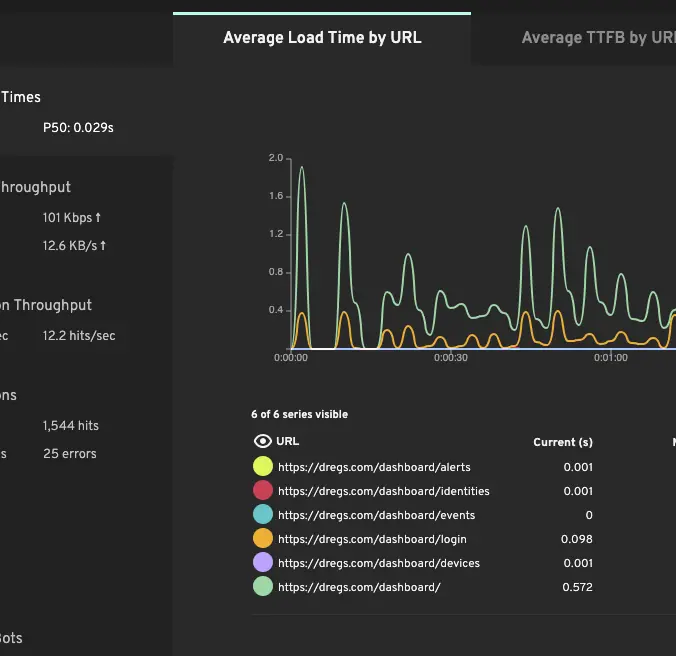
The response time hockey stick
Response times stay flat as load climbs, then spike sharply — the classic non-linear degradation pattern. Identifying this inflection point tells you the load level at which the user experience falls apart.
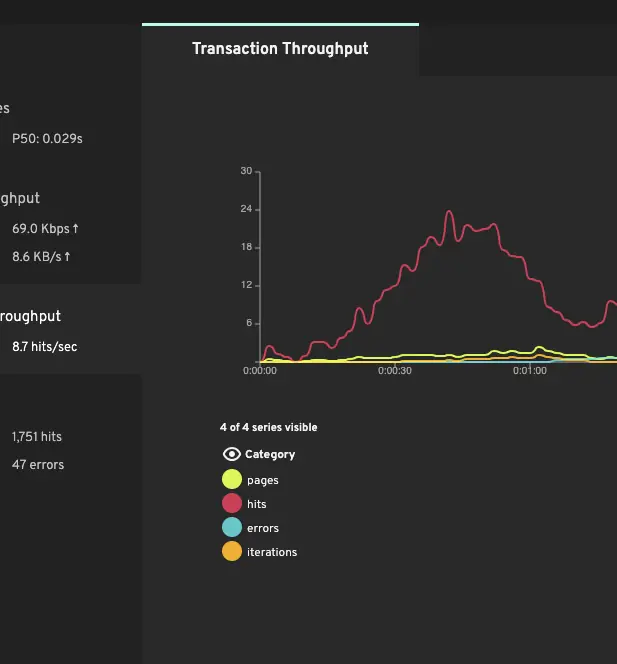
The throughput plateau
Requests per second climb proportionally with concurrent users until something saturates. The plateau is your application's maximum throughput. Beyond it, additional users just queue up, timeout, or get errors.
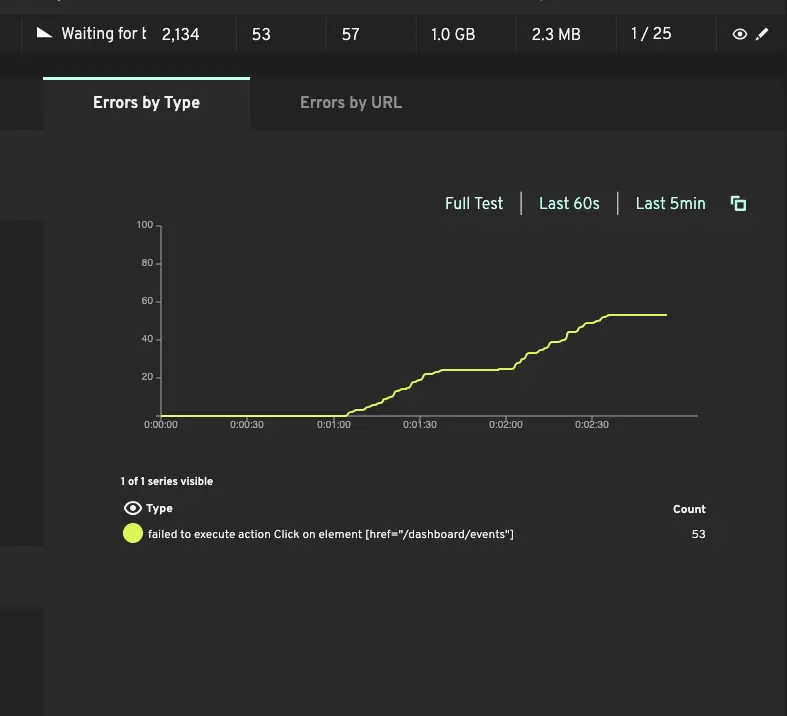
The error fingerprint
HTTP 502s and 503s from overwhelmed load balancers. Socket timeouts from servers refusing new connections. Application 500s from exhausted connection pools. The mix of errors at the breaking point identifies which component saturated first.
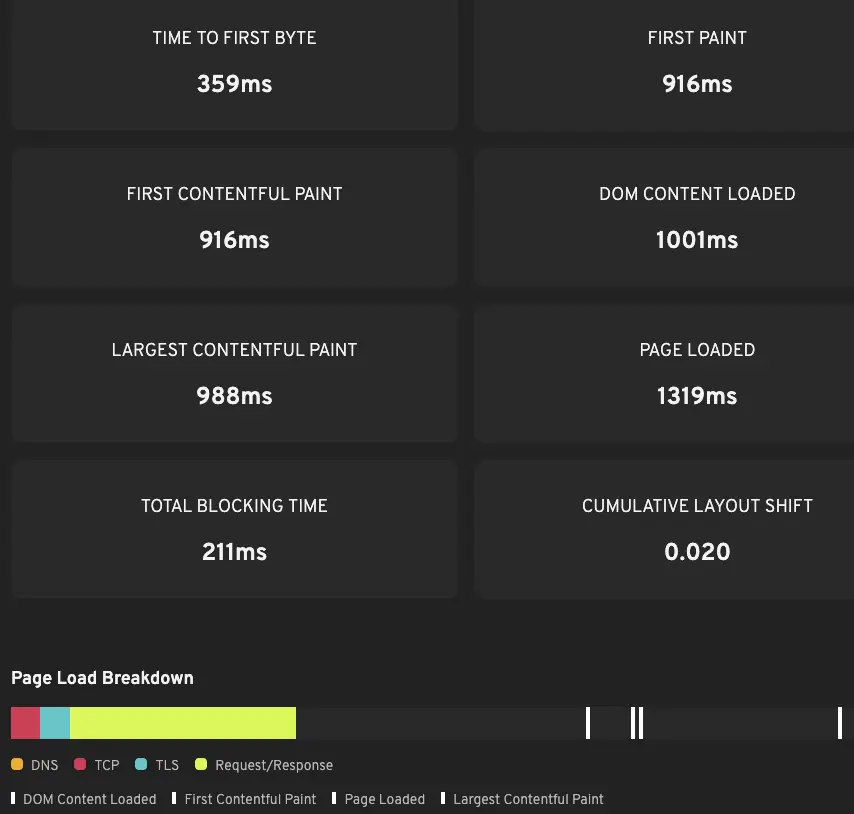
Core Web Vitals under stress
For browser-based stress tests, TTFB, FCP, LCP, and CLS are captured per page navigation. These often degrade well before the backend starts returning errors — a useful early-warning signal that the user experience is suffering.
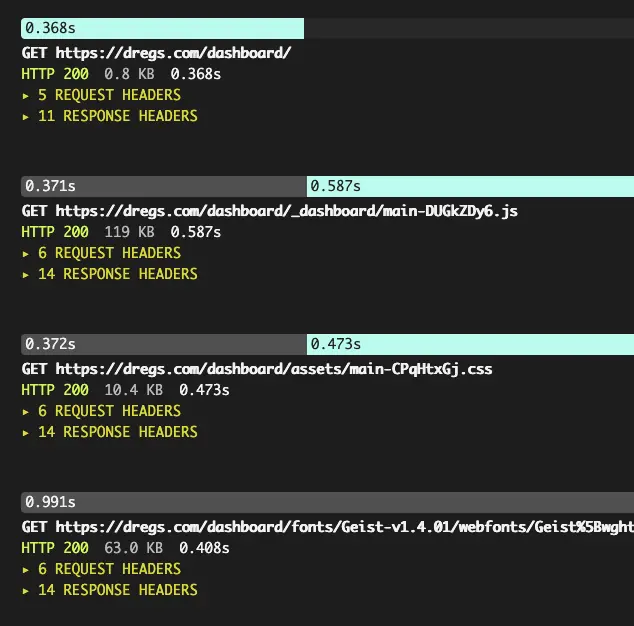
Failure-mode traces
Each failed bot stores the full request/response trace and, for browser-based tests, screenshots of what the bot saw. When errors spike at 800 concurrent users, traces are usually the fastest path from "things broke" to "here's the failing query."
Iterate quickly with your stress testing. Loadster's cloud testing platform helps you move faster: browser-based script recording, live test metrics, automatic reports.
Record test scripts
Record stress test scripts right in your browser with the Loadster Recorder extension for Chrome or Firefox. Just navigate your site like a real user, while Loadster automatically records every action into a reusable test script.
Edit and replay scripts
Play scripts as often as you like in Loadster's script editor. Bots execute your script and give you immediate real-time feedback. In the editor you can add, edit, and replace steps from the recording, or you can even build a script from scratch.
Configure test scenarios
A scenario is a reusable configuration for a stress test. You'll specify the number of bots in each group, the AWS or GCP regions bots will run from, which of your scripts to execute, and the schedule for ramping the load up and down.
Launch your stress test
When you launch a stress test from a scenario, Loadster quickly spins up cloud resources to power your bots. Tests usually start in about 2-3 minutes, using fully managed infrastructure through Loadster's AWS and GCP cloud providers.
Observe real-time results
While a stress test runs, your bots report real-time metrics to Loadster, and Loadster surfaces the latest details and diagnostics within seconds. Keep tabs on response times, throughput, errors, and detailed traces so you can see how your site is performing under load.
Generate test reports
After a stress test finishes, Loadster automatically creates a detailed report so you can review your site's performance and scalability. This includes detailed graphs showing response times, errors, network and transaction throughput, and more. The report also includes detailed traces with request and response bodies or screenshots to help with troubleshooting.
Repeat and iterate
Stress testing is an iterative process, and it's rare that everything goes perfectly on the very first try. After all, the point of the test is to discover scalability bottlenecks so you can fix them instead of crashing in production. With Loadster you can quickly re-test a previous scenario, or make changes to your scripts or scenarios and run again at any time.
Does your site recover after a traffic spike? Stress testing isn't over until you've seen how the system bounces back.
Some applications recover automatically once excess load subsides — response times drop back to baseline, errors stop, queues drain. Others stay broken until someone restarts them. The interesting cases are in between: half-recovered, with a slow-burning issue you wouldn't have spotted unless you were specifically watching for it.
During the post-stress phase, Loadster keeps reporting metrics while the load drops to zero. Watch for:
- Response times — do they return to baseline within a reasonable time?
- Error rates — do they drop to zero, or settle at a non-zero floor?
- Background queues — if your application uses async workers, do they drain?
- Database transactions — commit cleanly, or stuck in flight?
- Caches — rebuild properly, or stuck warming up under residual load?
If your application requires manual intervention to recover, that's a finding worth fixing before the stress test happens in production for real.
Stress test on demand from 32 AWS and GCP cloud regions. Monitor continuously from 8 locations across 5 continents.
Reuse your stress testing scripts as 24/7 monitors. The same scripts that pushed your application to its breaking point can continuously monitor its uptime and performance.
Once you've stress-tested a critical flow, your script is working. Schedule it as a monitor on the same platform — a single bot running every minute, every five minutes, or whatever cadence makes sense. If something breaks between stress tests, you'll know about it before users do.
Loadster scales with your testing and your budget. Choose between flexible pay-as-you-go and predictable subscription pricing.
Monthly Fuel Plans
Starting at $77 a month
Subscribe to a monthly plan to automatically add fuel every month at a discount. Unused fuel rolls over as long as you keep the plan.
Check Plan PricingPay As You Go
Starting at $97 for 1000 units
Purchase as much Loadster Fuel as you need for your load testing and monitoring. No commitment, just buy it when you need it.
Check Fuel Pricing


